Automate the work around delivery.Start with the outcome, not the agent.
Every use case is a controlled run with a defined trigger, a scoped slice of Azure DevOps context, permitted actions, an approval boundary, a verification step and a run record. Pick the outcome your team needs, then choose the agents that deliver it.
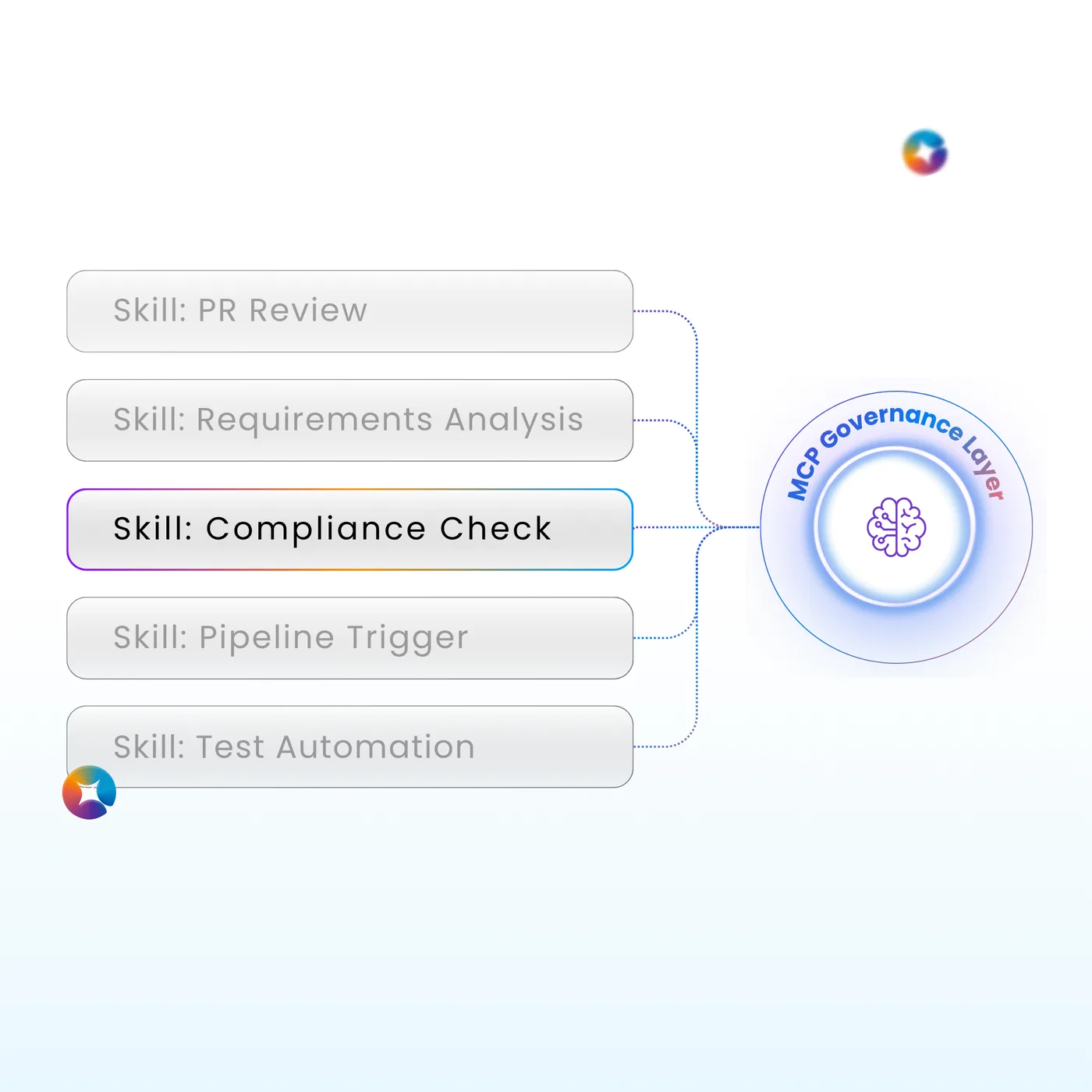
One governed run model across the lifecycle.
Each family groups the outcomes teams ask for most, names the Azure DevOps services it works across, and runs on the same seven stages: trigger, context, decide, act, approve, verify, record.
Plan & specify
Runs when work items are created, refined, prioritized or moved to Ready. Checks completeness, drafts or validates acceptance criteria, decomposes scope and keeps the links downstream teams rely on. Works across Boards and Wiki.
Backlog readiness
When an item moves to Ready, return a structured readiness result, flag missing information, apply policy-based updates and open follow-up tasks.
Acceptance criteria
When a story is created or its description changes materially, draft testable criteria grounded in business intent, non-functional needs and your configured standards.
Epic decomposition
Propose candidate features and stories with boundaries, dependencies, assumptions and review questions, before any child item is created.
Duplicate detection
On new items or a scheduled backlog scan, surface likely duplicates with similarity evidence and a link or merge recommendation.
Change impact
When a requirement changes after baseline, name the designs, code, tests, hazards, documents, releases and owners it affects.



run started · STORY 4821 → Ready
required fields and links · rules passed
criteria review · 1 criterion untestable
checkpoint · rewrite awaiting BA review
record · readiness result on the item
ILLUSTRATIVE RUN · EVERY RUN LANDS IN YOUR JOB LOG
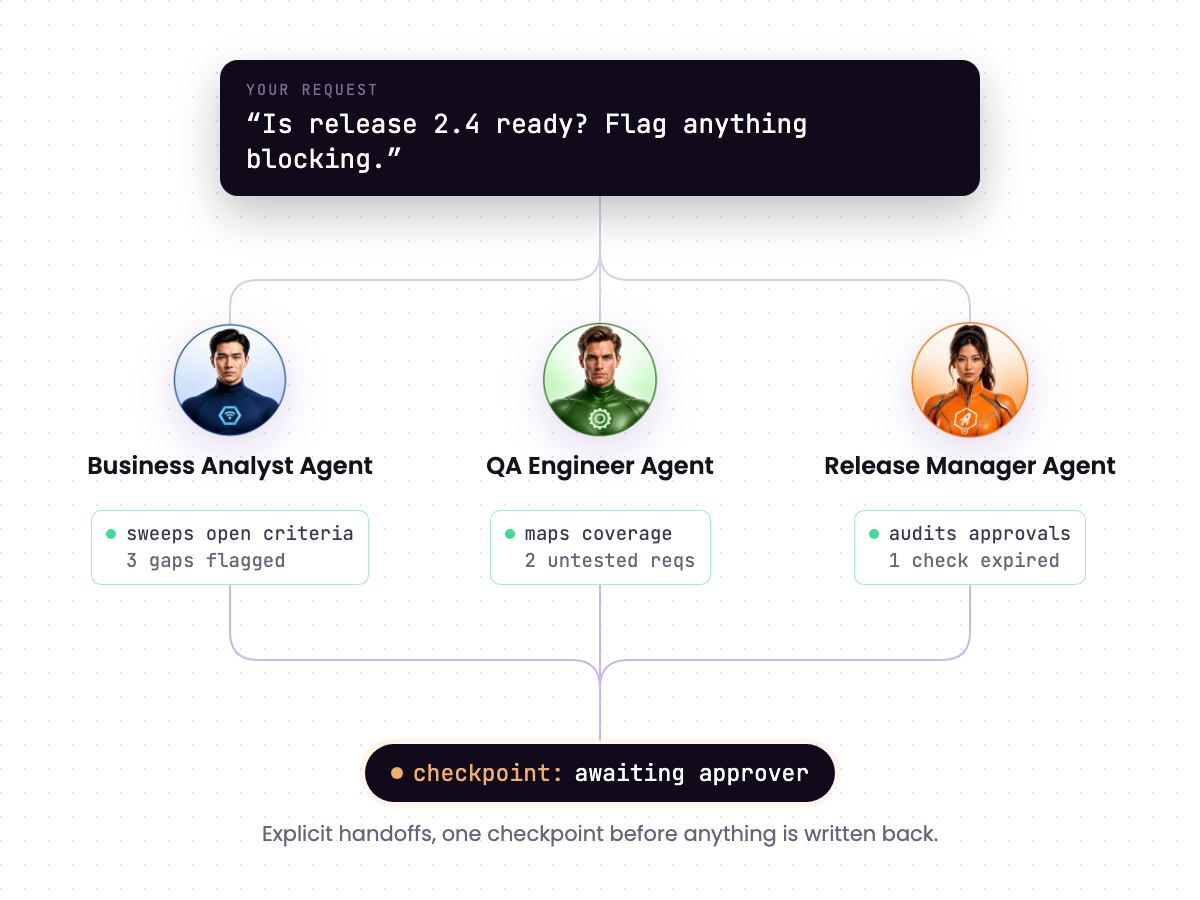
One request spins up an entire team.
Ask for release readiness and the work fans out: one agent sweeps the criteria, one maps test coverage, one assembles the approval trail. Explicit handoffs, one checkpoint before anything is written back.
Drafted acceptance criteria on STORY 4821
Business Analyst Agent · event: moved to Ready
Reviewed PR !412 against linked criteria
Product Engineer Agent · event: PR opened
Pipeline fix proposed, awaiting approval
DevOps Engineer Agent · checkpoint held
Generated 6 test cases from changed criteria
QA Engineer Agent · event: criteria updated
Nightly branch-policy audit completed clean
Compliance Officer Agent · schedule: 02:00
Release notes drafted, waiting on sign-off
Product Owner Agent · checkpoint held
Evidence pack assembled for release 2.4
Compliance Officer Agent · manual run
Backlog hygiene sweep · 12 items annotated
Business Analyst Agent · schedule: weekly
ILLUSTRATIVE FEED · EVERY RUN LANDS IN YOUR JOB LOG


One workflow first. Then the next.
The most reliable sizing is your own usage. Prove one outcome end to end, read what it consumed, then widen the scope.
Pick one or two real workflows.
Choose a recurring job with a clear trigger and an owner who can judge the result: release readiness and evidence-pack assembly are strong first picks. Run the free trial against your own project, not a sample.
Run it with the checkpoint on.
Turn on Required Approval so every draft waits for the named reviewer. Compare each output with how the team does the job today, and refine the instructions, knowledge and scope until the drafts are right.
Review consumption per agent.
In the first 30 days, use the Jobs view to see what each run consumed by agent and module. Scope tightly to a project, area path or work item type: it controls cost as well as access.
Move rule-shaped work to Execution Agents.
That review usually shows which checks fire often and follow fixed rules. Convert them to Execution Agents at a flat 4 credits a run, then add quality and test, security and dependency workflows, and scale to portfolio reporting.

[ Trusted by Microsoft and industry leaders ]




Questions about use cases.
A recurring one with a clear trigger, a named owner and a result that is easy to check. Release readiness, evidence-pack assembly, a Definition of Ready check or failed-pipeline triage all fit. Bring one to the demo and we will run it end to end.
Only a trigger your team configured: a manual request, an Azure DevOps event you selected such as a story moving to Ready or a PR opening, or a schedule you defined. An agent cannot add its own triggers, and a disabled agent does not run at all.
Yes. A multi-agent workflow coordinates several agents with explicit handoffs and approval boundaries, as in the release-readiness example above. Each agent's run is recorded separately in the job log.
No. Agents work through your existing Azure DevOps controls. Branch policies, environment approvals, service-connection permissions and release ownership all still apply, and actions with side effects pause for the configured reviewer.
Every run ends with post-action checks that confirm the expected state, link, result or successful rerun exists. A run is not treated as successful until the result is verified, and the job log keeps the trigger, checks, changes, approvals and output.
Put high-frequency, rule-shaped checks on Execution Agents at a flat 4 credits a run, scope reasoning agents tightly, and choose a lighter model for routine drafting. Credits are pooled with no per-user fees, consumption alerts fire at your threshold, and agents pause at zero.
No. Agents prepare, check and assemble: readiness results, coverage maps, evidence packages and release summaries. Qualified people make the safety, compliance, certification and go/no-go decisions.
Bring one workflow. Watch it run.
Start the free trial with 2,000 credits and no card, or book a 30 minute technical demo with a real work item, pull request or failed pipeline and see the trigger, checkpoint, verification and run record live.